Tablets and laptops and smartphones, oh my!
Issue 96 : May/Jun 2014
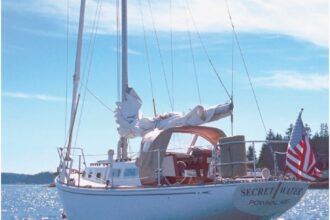
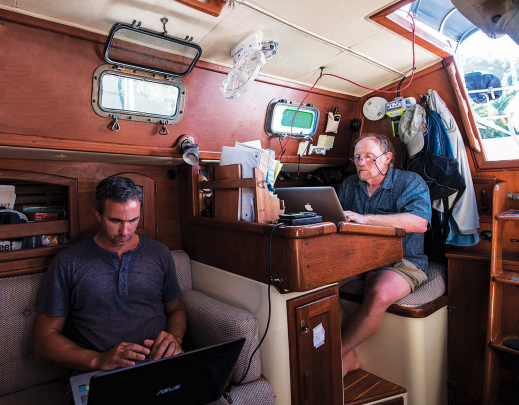
Not long ago, I had the pleasure of helping to sail Alaria, a Pacific Seacraft 34, from Maine to the Caribbean. The other members of the crew, Bob Steneck, Ansey Sawyer, and Curtis Smith, were all in their sixties, making me the youngest by nearly four decades. This was part of the appeal. I signed on for the passage expecting to learn a bit about offshore sailing from these “good old guys.” And I did, of course. The bit I wasn’t expecting was an education in the many uses of electronic gadgets on a cruising sailboat.
On my own boat I’m a bit of a Luddite. Since that term is often misused, let me clarify. The Luddites, a band of 19th century machinery-smashing textile artisans, were not opposed to technology in principle, nor were they unskilled in its use. They were rejecting (with sledgehammers) the introduction of machines that were rendering their hard-earned skills obsolete. I’m not about to take a hammer to your chart plotter, but I am wary of the sometimes unintended changes technology can make in the ways we sail our boats. So on my boat I keep electronics to a bare minimum.
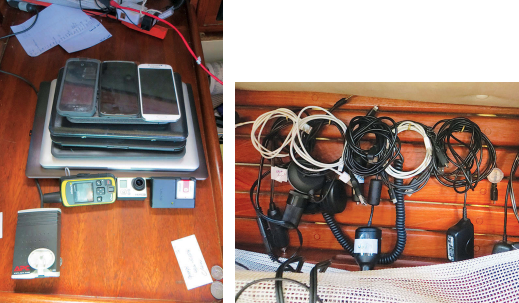
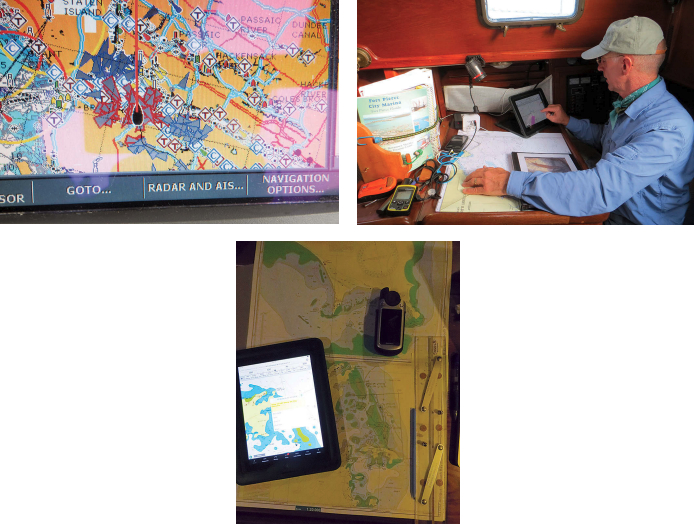
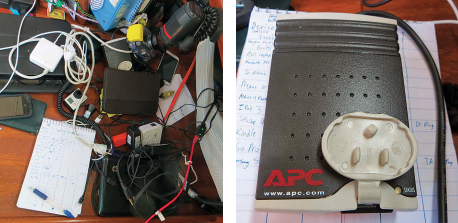
Alaria was a brave new world for me. We did everything electronically, and at any one time probably a half dozen gadgets were either charging or running. We downloaded GRIB files onto iPads and iPhones for weather forecasts, then plotted our progress with vector and raster charts on the same devices, comparing them to the dedicated chart plotter. This track was uploaded in real time to a website so families and friends could see our progress — an automatic feature of our DeLorme inReach satellite communicator. We took high-definition video with tiny GoPro cameras, then edited these and uploaded them to the Internet on high-powered laptops using a Wi-Fi antenna that we hauled up a flag halyard. We also carried all the trappings of modern life including smartphones, tablets, and e-readers.
This sounds like a lot of tech for a small sailboat. It certainly looked like it when I piled all the devices up for a photo, but not one of these gadgets is unusual on a cruising boat today. For navigation, communication, and safety at sea these devices have become the primary tools of many modern sailors. Few would leave port without at least a couple of them aboard.
Apps for everything
So how did all this technology affect the way we sailed Alaria? Mostly, it was useful and much more versatile than I was expecting. With the many gadgets, we were able to do all the routine cruising activities: downloading tide, current, and meteorological data; plotting routes; and writing blogs and emails to keep in touch with home. But we also used some very innovative and rapidly evolving technology that has been around for just a few years.
For example, ActiveCaptain is a program for computers, tablets, and smartphones that gave us “crowd-sourced” information at each of our destinations and helped us answer questions like “Where is the chandlery
in Bermuda?” or “Which side of St. Maarten/St. Martin (the island is half Dutch and half French) is a better base for boat work and grocery restocking?” If you download the ActiveCaptain files before heading out, you can retrieve all this information without an Internet connection.
Weather apps allowed us to download GRIB files and watch a simulation of our projected track through eight days of wind and wave forecasts. Other apps that fell somewhere along a curve between useful and merely entertaining were anchor drag alarms, programs for crunching celestial navigation data, sailing tactician apps aimed at racers, and a sky map that labels the stars of the night sky and is calibrated to show the area you point to with your smartphone.
We carried a DeLorme inReach satellite communicator that uses the Iridium network to track your position and send out an SOS if needed. It also sends and receives short text messages. We used the text message feature to receive brief mid-passage weather reports and routing advice at a fraction of the cost of a satellite phone or SSB radio installation. Considering that we were making open-water passages of up to nine days during hurricane season, Bob decided this feature alone was worth the $300 price tag. The inReach tracking also allowed our friends and family to know exactly where we were at all times by tracking our progress on an online map. This was a bit embarrassing when we got stuck in light headwinds two days out of Bermuda and our track zig-zagged back on itself, but it was greatly reassuring for the old guys’ wives to know just where they were.
Alaria is equipped with an AIS receiver tied into the cockpit-mounted chart plotter. It told us the movements of most commercial shipping and many pleasure boats within 10 miles. We also had four personal AIS transponders, small devices that clip onto a belt or inflatable life jacket and allow precise tracking of an MOB. Though by no means essential, the AIS was very reassuring in passing situations with larger vessels, not least because it displays the vessel’s name so you can call the bridge directly over the VHF if the need arises. No more hailing “the large shipping vessel to the northeast of the small sailing vessel entering the cut outside of Norfolk Harbor . . .” Thankfully, we never had occasion to try out the personal transponders, but they certainly added to our sense of security.
Digital disagreements
We live in an era in which the value of information is nearly sacrosanct and it is generally assumed that more information is always better. On Alaria, we were more connected and more information-saturated than I have ever been on a sailboat, and this was generally to our advantage. But all this information was not unequivocally better for us. Useful as it was, our glut of technology changed life on the boat in subtle ways not always for the best; it could be unreliable, distracting, and even a bit dangerous.
Our various electronic charts sometimes showed significant differences of opinion, for example, and we had occasional bogus positions from some GPS devices. Discrepancies between chart editions or publishers, and occasional plotting errors, are not unusual — even with paper charts and more traditional navigation techniques — but they can take on new significance in the digital age. Minor errors in vector charts or electronic glitches can be critical when we use the extreme accuracy of this technology to sail imprudently close to hazards, as many of us are occasionally wont to do.
The GPS in our inReach was prone to temporary position glitches. On several occasions, we fielded concerned calls from friends and relatives who thought we had run into some disaster after seeing our little blip recorded on dry land. My plan to prank our families by sending the inReach along with a crewmember who had to go to Oregon for a few days was vetoed, unfortunately.
Digital distractions
That can be a problem with technology. These tools are so much fun, it’s hard to resist playing around with them. Many a coastal sailor has been appalled to witness the watchkeeping habits of offshore passagemakers, but the fact remains that there simply isn’t much to do on night watch in fair weather. When counting stars gets monotonous, technology can provide a welcome distraction. Occasionally, on calm nights, iPads and tablets made their way to Alaria’s cockpit, where they may or may not have been used to watch a movie or two. It was a pleasant way to break up a watch, but it is a delicate balance. Oddly enough, it seemed to be mostly on these calm nights that the wind would “suddenly” pick up and catch the person on watch unawares.
We didn’t just carry our technology with us, we also used it to connect to home. At anchor, we would hoist a Rogue Wave Wi-Fi antenna on a flag halyard and this gave us Internet access in most places we stopped. My favorite use for this was Skype calling. Even in the Caribbean, we were able to make phone calls to the U.S. for a few cents a minute. But our after-dinner conversation was sometimes cut short by the appearance of the Wi-Fi antenna and, although we found connections in surprisingly remote locations, the availability of a signal could be a factor in our choice of anchorage or even our cruising plans. Since this was primarily a research trip to study coral reefs, the Wi-Fi antenna was an indispensable tool, but having Internet access aboard changed more than just our work habits.
This was true for most of our “work” gadgets. Most tools on a boat serve a single purpose: a chart tells you where you are and where you might go, a wrench applies force, a stove feeds the crew. Electronic devices are different. An Android tablet can be used for navigation and weather forecasting, but with it you might also call family, watch a movie, or identify stars. While you’re at it, if you’re able to download emails as well, you might then feel obligated to reply to them and, without meaning to, you are soon hard at work and oblivious to that lovely little cove where you’re anchored. These new tools are incredibly versatile and powerful, but for those of us who take to sailboats at least in part to escape the stifling connectedness of shoreside life, they are sometimes more than we bargained for.
Electrical consumers
Furthermore, they run on electricity, ever a precious resource on a cruising boat. Before the start of this trip, Bob did some careful calculations and decided Alaria should have more passive power generation. He installed a large solar panel and a wind generator, hoping to get away without having to run the engine to charge batteries. I expect this would have worked, if it weren’t for all the gadgets. When the wind picked up, we generated power without the engine, but more often than not our gadgets sucked it out of the batteries. Most of these electronics seem to use little power, but some were heavy hitters. There were also losses and idle drains to consider as many of the devices were run or charged through inverters.
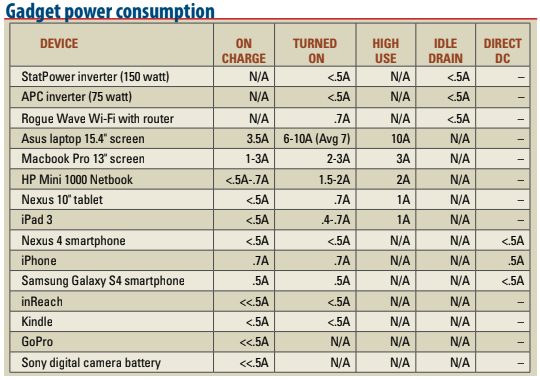
I grew curious about where our electricity was going and devised a simple test. I switched off the wind generator, covered the solar panels, and turned off every circuit. Then I plugged in each device by itself and recorded its power consumption as relayed by the Xantrex monitor. Whenever possible, I recorded current draw while turned off and charging, while plugged in and in use, and while plugged in and being used on high power (such as while watching a movie). For items that could charge with DC or AC current, I measured power consumption with and without an inverter in the system, and I measured the idle drain of our two small inverters. I wasn’t going to get lab accuracy this way, but the test worked well enough to get a sense of which items are the big power consumers. The results are in the table.
While these results were broadly predictable, they were nevertheless interesting. I hadn’t expected small items like smartphones or cameras to use much power, but I was particularly impressed with the low power requirements of the tablets and the HP Mini. The Mini is my “netbook,” a very small laptop. Apple products fared particularly well on the test. While the iPhone sipped a fraction of an amp more than the other smartphones, the iPad was very efficient and the Macbook Pro used less than half as much power as the slightly larger Asus laptop.
This test also showed the efficacy of carrying one or more small inverters aboard. My boat has an 1800-watt Xantrex inverter/charger wired to outlets in the cabin. That much juice is very nice when I run power tools, but it comes at a price — my inverter draws 1.5 amps when it’s on. That’s not a lot of power, but it is significant over time. If I used this inverter just to charge my HP Mini or a tablet, I would be more than doubling the power consumption of that device. A small inverter like the ones on Alaria can charge a laptop or tablet and will consume only a fraction of an amp. These inverters are available at auto parts stores. Even marine-grade versions cost less than $50.
Most phones and tablets can also be charged directly from the DC system using a cigarette-lighter-type adapter. This is slightly more efficient than using a small inverter to charge with AC power.
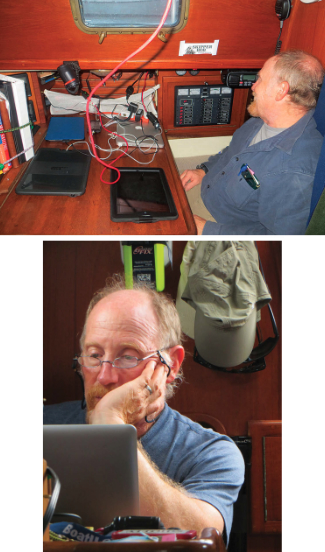
Laptops were the big power consumers aboard Alaria. The 15-inch Asus took a steady 7 amps, more than our refrigeration compressor! Admittedly, this was a high-powered laptop used for video editing, but consider that many sailors keep laptops running on passage and use them for navigation. Even with a more modest computer, this can account for up to 150 amp-hours a day, more power than a lot of boats can passively generate when under sail. A smaller tablet-type device can serve the same purpose for less than 20 amp hours a day and can cost as little as $100. With a chart plotter in the cockpit and vector charts on a tablet, we were able to turn off the laptops when passage-making and rarely had to run our engine for charging.
Navigation by tablet
Not all tablet navigation apps are as good as the best ones available for laptops, but they are rapidly improving and are much cheaper than computer software. Some are free and plenty good enough to serve for backup navigation. Android devices and iPads have plenty of navigation and sailing software available, all of which can be run on smartphones as well.
Accurate navigation calls for an external GPS, yet another device to buy and something else that could break, but the same is true of laptop navigation. The price of a reliable external GPS is around $100. High-quality vector charts for much of the world can be downloaded and cost something like $30 for a continent’s worth. The availability of charts for a fraction of what they cost only a few years ago makes this a particularly attractive option for a small cruising boat where system costs and power consumption are primary considerations. Personally, I think this is a game changer for auxiliary navigation devices on small vessels. My next boat purchase will be a tablet with an external GPS and charts for the U.S. East Coast and Caribbean. The whole package should run less than $300! While I’m trying to learn celestial navigation and use it with my paper charts, the GPS, tablet, and charts will be my nod to modern navigation, the electronic method I learned about from sailing with the old guys.
Rapid evolution
There’s nothing new about technology changing the way we sail. This has been happening since the invention of the backstaff or the first time someone sat down to draw out a rudimentary chart. What is unique to the present moment is the pace of this change. Affordable technology with potential benefits for the average sailor on a reasonable budget is now being developed more rapidly than at any time in the history of sailing.
Alaria is a great example of what this technology can do. On a 34-foot sailboat with a modest electrical system and a limited budget, we had multiple fully redundant electronic navigation devices, the ability to make and receive phone calls from harbors around the globe, and the ability to receive weather reports and keep in touch with family while hundreds of miles offshore. With this core technology came plenty of interesting bells and whistles. Just 10 years ago this might easily have been $10,000 worth of tech. Now it can cost less than $1,000.
Undoubtedly, it’s great to have access to this equipment and now is a good time to consider how we might incorporate these new tools into our safety systems and sailing lifestyles. Still, I hope we’re not entering an era in which a cruise to some remote place is no longer accepted as an excuse to change your voicemail, set up an auto-reply on your email account, and step away from the modern world for a time. Just to be sure, I’ll be keeping my boat relatively low-tech and my paper charts handy.
Paul Calder has lived on sailboats much of his life and is finally learning how to sail properly. After a 10-year recovery on terra firma from a childhood spent cruising the Caribbean, he just completed a shakedown cruise on his own good old boat, a newly refitted Cape Dory 28. Paul blogs about that refit and other sailing topics at www.sailfeed.com/writers/paul-calder.
Thank you to Sailrite Enterprises, Inc., for providing free access to back issues of Good Old Boat through intellectual property rights. Sailrite.com