Satellite radio delivers data and images to the cockpit
Issue 90: May/June 2013
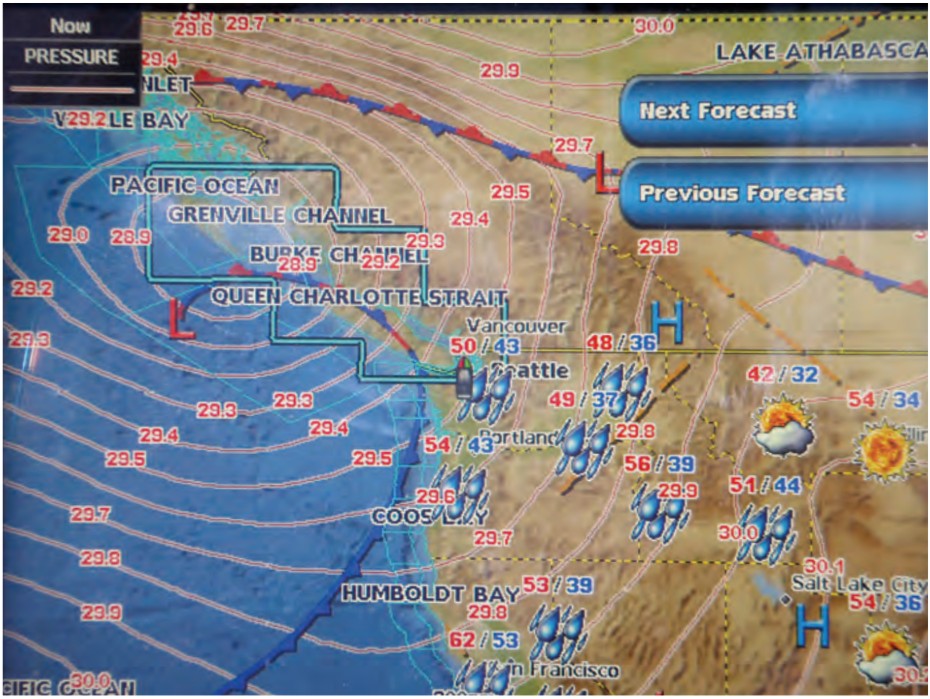
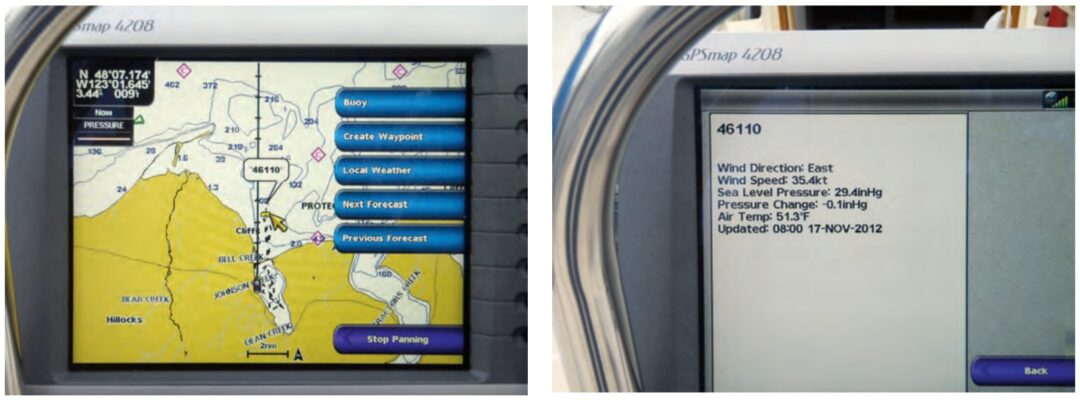
It seemed almost magical. I was in the cockpit of our J/32 on Sequim Bay in western Washington state, yet displayed on the chart plotter mounted at the binnacle were the isobars and frontal boundaries associated with Hurricane Sandy as it was coming ashore in New Jersey. I was also able to check the latest buoy reports from the weather buoys moored along the Eastern Seaboard.
This was possible because of the satellite-weather capability I had just installed. I could “see” all the weather, rather than listening through weather-radio broadcast loops that gave me a “view” of only part of the weather.
Several times during recent cruises along the central coast of British Columbia and the west coast of Vancouver Island I had wished for better or easier-to-use weather information. While listening to the latest weather-radio broadcasts, I really missed being able to see a surface-analysis chart showing the locations of major frontal boundaries and isobars. I often thought how nice it would be to simply click on a display and pull up the conditions and forecast for a particular region. Another click might take me to a report from a strategically located weather buoy or to a surface-analysis chart that would help me understand the current conditions. All of this could be possible with the XM WX Satellite Weather service.
The beginnings of a plan
I had followed the blog Good Old Boat editors Karen Larson and Jerry Powlas posted during their three-month exploration of Lake Superior in 2011. Their positive references to WxWorx satellite weather finally triggered action on my part. It was time for a plan.
On their C&C 30, Mystic, Karen and Jerry displayed weather information on a laptop computer. Our electronic navigation capability aboard Sirius is based on a chart plotter, so it was appropriate to add satellite weather as an overlay on the chart plotter display. The first decision was easy. We had a Garmin GPSMAP 3206 chart plotter installed on the binnacle guard. Garmin sells a satellite receiver (GXM 51) that can receive the weather data broadcast by XM WX Satellite Weather and send it to the chart plotter. (Many other hardware solutions are described on the XM WX Satellite Weather website.) Using the Garmin receiver would assure full compatibility with our Garmin chart plotter.
However, I had to overcome an immediate technical challenge. The GXM 51 is designed to use the new network standard, NMEA 2000. Our GPSMAP 3206 has ports only for NMEA 0183, the older network standard. These were being used to communicate with our VHF radio, AIS receiver, autopilot, and TackTick sailing instruments.
I expect that most of the satellite weather solutions available today will require an NMEA 2000 network. It is also likely that most good old boaters have the NMEA 0183 network aboard if they do have a network installed. This networking issue may impact many readers who are interested in having satellite weather aboard. A quick comparison between these two marine network standards is worthwhile. They’re quite different in their physical and logical characteristics.
Lecture vs. discussion
NMEA 0183 was designed around the transmission of data “sentences” from one “talker” to multiple “listeners.” This is a one-way communication and the devices must be hardwired together. To accommodate multiple “talkers” you need separate networks and separate ports in the chart plotter or computer. It is possible to buy a multiplexer that can combine the sentences from two or more talkers into a single data stream. The standard baud rate for NMEA 0183 is 4,800. However, a high-speed standard using 38,400 baud also exists for use with AIS data.
NMEA 2000 is based on Controller Area Network technology originally developed for use in the auto industry. It is designed to be plug-and-play and to accommodate multiple talkers and listeners. The standard provides for the devices to negotiate for access and thus avoid conflicts between talkers.
Physically, an NMEA 2000 network is implemented using a long five-wire cable with 120-ohm terminators at each end. This is referred to as a backbone. Tees inserted into the backbone are used to inject power and to connect each device to the network. The drop cables used to connect a device to a tee in the backbone can be up to 6 meters long. Most devices are powered from the backbone, although a manufacturer might make separate power provisions for a device that needs more power than the network can supply. The design of the message structures ensures that data gets reliably from a talker to the appropriate listeners along the shared backbone. The data rate along the backbone is 250 kbit/sec.
A mediator
On the Internet, I found a possible solution for dealing with the two NMEA network standards. I would need a bridge device that could translate the NMEA 2000 message packets into NMEA 0183 sentences. Then, I would need a multiplexer to combine the output from the bridge with the output of our NMEA 0183-based AIS receiver. These devices are available from several manufacturers. However, they are not inexpensive. They also contain a lot of firmware, and it appeared that I would need to configure them for my specific application. Reading the manuals I downloaded from the Actisense website, I realized that, in order to perform this configuration step, I would need to connect the devices to a computer running an appropriate version of Windows operating system. As I am a long-time Mac user, this would create an additional challenge.
This led me to consider an alternate path: upgrading the chart plotter. The Garmin GPSMAP 4208 was the next step up from our current unit. It incorporates NMEA 0183 and NMEA 2000 ports, so no bridge or multiplexer would be required. (Incorporating both network standards in chart plotters seems to be a common practice in the industry now.) This would make it easier to accommodate future upgrades of other electronic NMEA 2000-compatible devices on board. It would also allow the weather data to be brought in at the NMEA 2000 data rate, rather than throttling it down to the NMEA 0183 high-speed standard. The downside was higher overall cost and, as I soon realized, running anew all those pesky fine wires used with NMEA 0183. By the time I was finished with the installation, I had developed a very high regard for the plug-and-play nature of NMEA 2000!
Weather subscription
Once the new system was fully functional, I called Sirius XM WX Satellite Weather to initiate service. Their customer service agent helped me set up an account to be charged against a credit card. I provided the ID number for our receiver so the system would recognize it and provide the data package I selected. They currently offer four weather packages. The monthly prices climb in proportion to the range of weather information included. The company allows boaters to stop and start the service again if they use their boats only seasonally. Within 15 minutes of placing the call, my system noted that a subscription was in effect and was beginning to download weather data.
Our local sail fleet continues to race every other Saturday through the winter. I used this winter sailing schedule to get more familiar with the weather services provided and check their reliability before my wife and I head out for an extended cruise this summer.
So far, the buoy reports and the surface analysis charts have been the most useful, followed by the forecast for sea state and surface winds out in the Strait of Juan de Fuca. I can also see how the NEXRAD radar overlays would be useful for boaters in areas where strong thunderstorms or squall lines are of concern. Based on my experience so far, I’m confident that, during our next extended cruise, we will find the benefits of this addition well worth the effort and expense.
More online . . . For more details about the installation as it applied in Durkee’s case and may apply to your boat as well, please see our More Online addition to this article. The description includes mounting and wiring the new chart plotter, installing the NMEA 2000 backbone, replacing the NMEA 0183 network, and installing the new antennas. Go to: www.goodoldboat.com/reader_services/more_online/wxweather.php.
Another approach — Jerry Powlas
Although Durkee was inspired by our access to satellite weather, he chose XM WX Satellite Weather while we have been using WxWorx. Both are offered by Baron Services and are based on their WxWorx division weather data. XM WX includes Canadian weather. WxWorx does not. Like Durkee, we sail on both sides of the boundary with Canada (he in the Pacific Northwest and we on Lake Superior). We wish we could receive Canadian forecasts and consider that information a significant improvement over WxWorx.
The difference between these products is the least of it. The way each of us has set up our system derives from substantial differences in the philosophy of how we run our boats, the way our boats were set up to begin with, and our cruising areas.
Although I occasionally single-hand, I sail with my wife, Karen Larson, most of the time, so there usually are two of us to do the work. My personal philosophy of sailing is that the helmsman should not be in sensory overload. His job is to steer the course and to be on lookout for other vessels and hazards. For this he needs a compass, a depth sounder, and engine controls. He needs to have his eyes and mind maybe 10 to 100 boat lengths out in front of the bow. If he has his head down and his mind deep in his electronics, he can become distracted from the primary watchkeeping and piloting jobs.
Electronic devices are important to us, but Karen and I don’t want them networked together. Just about every electronic device aboard our boat has failed in the 20-plus years we have cruised aboard her. We don’t want one device to bring down another. Our chart plotter runs on a laptop in the cabin. When we added the WxWorx service, we added it to our laptop.
It is not overlaid on the chart plotter. It operates independently. As a result, our setup was simpler. A satellite antenna on the pushpit rail connects to a receiver that connects to our laptop with a USB cable. That’s it. The laptop is a Mac, and we run either GPSNavX or MacEnc as our chart plotter. Since the WxWorx program runs only on Windows, we run a Windows emulator application called Parallels. It should be noted that even if the laptop fails, we know how to operate without it. We have paper charts and tools at the ready and we can survive without weather feedback. We like satellite weather updates and electronic chart plotters very much, but we don’t stake our lives or our boat on them.
Because the laptop remains in the cabin, we go below to view the weather. We generally check the weather each morning and any time the weather seems volatile. Most of the time, WxWorx is turned off and we run the chart plotter only. On long sails across open water, we often have both turned off to save on power consumption. Electronic devices can be hungry beasts.
I have a mate and I want her involved. Although we reverse roles frequently, Karen’s the primary navigator and I’m the primary helmsman. She spends a lot of time in the cockpit and runs up and down checking our navigation. Except for long passages when we’re alternating watches, we work the boat together. On overnight passages in open water, the helmsman can set the autopilot and go below to navigate and look at the weather (when need be) while popping up regularly to look around.
Our philosophy is to keep it simple.
Karen points out that another approach is evolving that involves the use of iPads and other handheld devices. These operate primarily when you sail within range of cell towers. But this field is developing so rapidly that satellite weather may already be available on an iPad. Chart plotters are already flourishing on devices that have built-in GPS receivers. If they don’t have satellite reception yet, can it be far behind?
Durkee Richards learned to sail in the Sea Scouts on the Columbia River. His first date with Mary Jeanne, his wife, was on a 15-foot 6-inch Snipe. During their last 10 years in Minnesota, they cruised Lake Superior on chartered boats until they bought their lightly used J/32 in 1999. After retirement, they moved to Washington’s Olympic Peninsula. They have now sailed their J/32 more than 16,000 nautical miles while exploring the coast of British Columbia out as far as Haida Gwaii and along the west coast of Vancouver Island.
Thank you to Sailrite Enterprises, Inc., for providing free access to back issues of Good Old Boat through intellectual property rights. Sailrite.com