Cruise with an iPad instead of paper
Issue 89 : Mar/Apr 2013
My wife and I were loading our Flicka for a five-week cruise on the Trent Severn Waterway, Georgian Bay, and the North Channel of Lake Huron and were appalled at how quickly we ran out of storage space. Since we would have to traverse the waterway with our mast down, we had to stow sails and mast-raising gear below in spaces where we normally keep other cruising supplies, including bags of boat and equipment manuals, cruising guides, and notebooks. It dawned on me that most of that paper stuff could be put on our iPad.
The iPad is in many ways preferable to a computer on a small boat. It’s small, has a long battery life, and consumes little power when being recharged. In addition to the Internet connection and GPS built into it, apps are available that can perform a variety of tasks useful during a cruise.
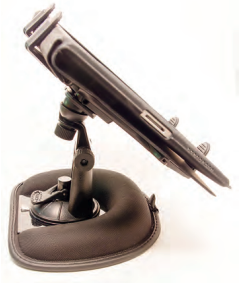
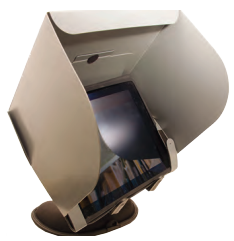
One caveat to bear in mind is that the iPad is not a marinized device. Apple can void your warranty if it detects high moisture levels inside. Of course, the same could be said for computers on board. So make an effort to keep your iPad dry. We also found that the iPad does not like being in direct sunlight for extended periods of time. It overheats and shuts down. If you are wondering, yes, many of the apps we used on our iPad are also available for the iPhone, but we found the larger screen of the iPad to be preferable when using many of them.
We used our iPad to help solve our space problem and found several other uses for it as well.
Document storage
We loaded onto our iPad manuals for our diesel engine, chart plotter, iPad, and head. Most manufacturers offer PDF versions of their manuals on their websites. We also loaded manuals for our cameras.
You can load PDF files onto your iPad via iTunes. You can read them with iBook, or with PDF reader apps such as GoodReader or Adobe Reader. We also loaded reading material, fiction and non-fiction, using the Kindle app from Amazon. We found a great app called ProKnot, that shows step-by-step how to tie a number of useful knots. Another one called RopeKnots offers animated videos of the knots being tied. Next year we plan to put food and spares inventories on our iPad using either an outline app or a simple database app such as Bento.
En route
Since we trailer our boat, we loaded apps from AAA, including a TripTik and travel guides. We also used the app MotionX-GPS Drive for turn-by-turn driving directions. Since we had an Internet connection on the road, we were also able to use the iPad to check for and make hotel reservations using apps from kayak.com and hotels.com.
Cruising resources
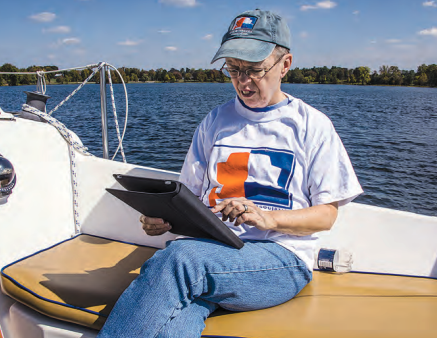
We found using navigation charts on the iPad to be a delight. The ability to pan and zoom with our fingers and to measure distances and plan courses was extremely useful.
The iPad is much more convenient for planning than a chart plotter. You can use the iPad instead of a chart plotter if you have an iPad model with GPS or if you connect an external GPS via Bluetooth, but you do need to be careful to keep the iPad out of direct sunlight to prevent overheating and minimize glare. It is also a good idea to put the iPad in a waterproof clear bag.
We used two chart apps extensively: Navionics US & Canada HD and iNavX with Navionics charts from X-Traverse. It is amazing that you can get charts of all Canadian waters and much of the eastern U.S. for around $50. The Navionics app comes complete with charts. For iNavX, you can purchase charts from X-Traverse or download free NOAA charts of U.S. waters. The prudent cruiser will, of course, also carry paper charts, as electronics can fail.
When we could get an Internet connection, we used the Windfinder app for wind forecasts. This app works on the iPad and iPhone. Of course, you can also use your Internet connection to check the weather or use apps from weather.com, or weather underground, wunderground.com.
Other applications
You can keep your log on an iPad with its simple text app or with the Pages app from Apple. If you maintain a blog, you can update it from your iPad.
A number of apps are available for the iPad for making to-do lists. Many games and videos are also available for entertainment at anchor.
We also used our iPad for email, online bill paying, and keeping up with news from home. Having your contact list on the iPad is handy.
We used our iPad to store and process images from our digital cameras as well. Our favorite app for processing images is Snapseed, but a lot of other apps are available.
If you lead a busy life, you can use the calendar app to help remind you of events or special dates.
Mike Nelson is a retired software and web-design consultant. He and his wife, Diana, sail a 1988 Pacific Seacraft Flicka. Mike is also president of the Trailer/Sailors Association www.trailersailors.org.
Thank you to Sailrite Enterprises, Inc., for providing free access to back issues of Good Old Boat through intellectual property rights. Sailrite.com