Have your boat text you when it’s in trouble
Issue 83: March/April 2012
Recreational boats can lead a lonely life. On the weekends, it’s party time with lots of guests and action. During the weekdays, they just hang around the docks gently tugging on their lines. That doesn’t mean they can’t get themselves into big trouble. They can drink too much . . . getting lots of water in the bilge. They can smoke too much . . . by having a fire on board. They can have undesirable guests over . . . with unwanted intruders.
Wouldn’t it be nice if your boat could send you a text message when one of these calamities occurred? Commercial systems are available that do this. Unfortunately, they cost more than $800 and have an annual service fee of more than $200. With a few off-the-shelf parts and some downloaded software, however, you can build a system yourself for less than $100 and obtain service for it for less than $50 a year. If you know a little about DC wiring, are able to solder two wires together, and can download a file off the Internet, you have all the necessary skills. Three components needed along with the software download are a pre-paid cell phone, a SIM card, and a microcontroller. Up to four optional inputs can be connected to the system for sending alarms. Inputs can be a bilge float switch, a magnetic switch on your hatch, or any other contact closure. (A smoke detector with a relay output is available, but for upward of $100.)
The phone
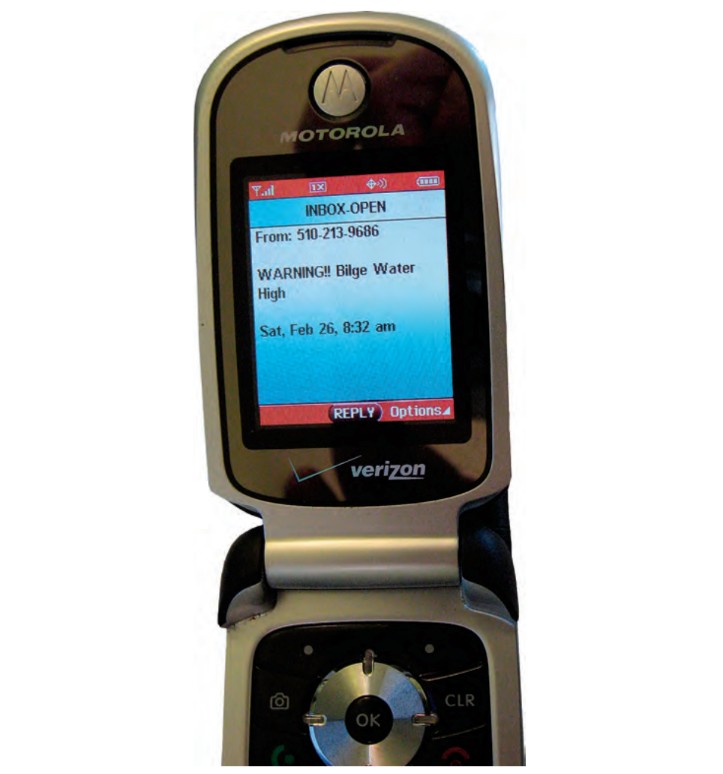
The Motorola C168i is an ideal candidate for this project. As it turns out, the headset jack on a C168i is also a serial port. This simply means it will accept digital signals from the microcontroller. This is the same phone that was originally used in Lo-Jack anti-auto-theft systems. Although these phones are out of production, they’re still available from several vendors for $25 to $40.
When buying the phone, make sure it’s “unlocked.” This means it can be used with any wireless carrier and has not been “locked” by one specific carrier. These phones were one of the original pre-pay “GO-PHONE” telephones by AT&T, so most will have an AT&T logo even if they have been unlocked.
Along with the phone, you need a SIM card and some pre-paid air time. The SIM card provides the phone’s identity with a specific carrier, such as Verizon and AT&T. I have found that, for this project, T-Mobile is the best deal. The T-Mobile SIM card is around $6. Add another $10 for air time. The T-Mobile $10 air time is good for 90 days and then automatically expires. You must buy more pre-paid minutes before the 90 days are up. A full year’s service costs $40. This assumes that your boat will not be sending you too many messages. Ten dollars’ worth of air time is good for about 30 send messages within the 90-day period.
Pre-paid T-Mobile minutes can be purchased online or from convenience stores, drugstores, and other outlets. Other carriers’ air time expires within 30 days, making them more expensive for a full year’s service. Before making a final decision on a carrier, make sure it offers coverage in the area where you keep your boat. Most carriers have coverage maps on their websites.
When you are actually on your boat, the cell phone can also be used as, well, a cell phone.
The microcontroller
I selected the Arduino Nano microcontroller for this project. This device is geared for hobbyists but is also used in commercial prototyping applications. If you have never worked with microcontrollers, this may seem a little daunting. Think of it this way: I have no idea how an iPod works but I can still download a song to it. Loading software into the Arduino is as simple as using your computer’s USB port. The Arduino Nano, carrier board, and connection cables cost about $65.
The software
You need two downloads. The first, from the Arduino website, is free. This software allows you to program the microcontroller. The second is a custom program I developed for this project that you can download from the Good Old Boat website (see “Resources”, below). This custom program requires some edits: you have to enter the phone number you want it to call and the message you want it to send for each event (smoke alarm, bilge alarm, or intruder alarm).
Each type of event can call a specific phone number and send out a specific message. As an example: Call 1-234-567-8962, send message “WARNING! Bilge High.” If you want a sensor activation to call two phone numbers (the second might be the marina, for example), that will require the input (the smoke detector, say) to be connected to two events on the controller.
This text message is sent by what is called SMS “Short Message Service.” Just about all cell phones today will accept incoming SMS messages. An SMS message can be up to 160 characters long. For this project, however, I would limit the message to 60 characters.
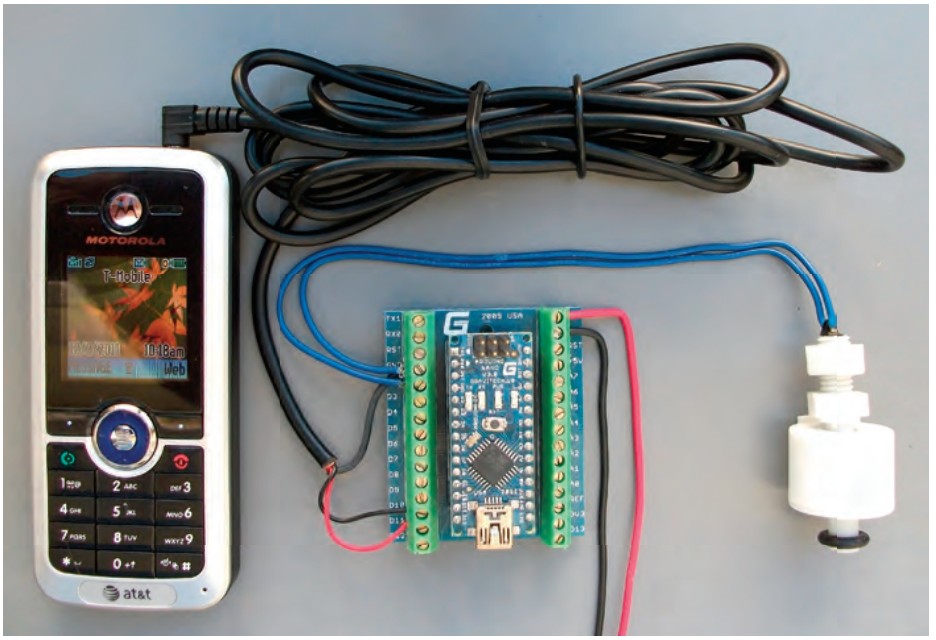
Putting it all together
With the phone attached to the microcontroller, any contact closure will cause the microcontroller to send a short message to the phone number you have programmed in it. After transmission, the microcontroller will hang up the phone. The micro will send out only one message for any event. After a message has been sent, it must be manually reset. This prevents the system from sending multiple messages for an event. Consider this scenario: if a high-bilge-water float is right at the activation point, any rocking of your boat would trigger multiple messages.
The fourth event is time-delayed. This is for an intruder alarm. If a magnetic switch installed on your hatch is triggered by somebody opening the hatch, there will be a 30-second delay before any message is sent. Just like a home alarm system, this allows sufficient time for you to de-activate the alarm before a message is sent when you are the one opening the hatch.
If you have shorepower available at the boat, the AC charger supplied with the cell phone will keep the cell phone fully charged at all times. If not, a 12-volt-DC car charger for this model of phone can be purchased at a very low cost. The Arduino and cell phone draw about 25 milliamps at 12 volts DC, so budget about 18 amp-hours of house battery consumption per month. A 5- to10-watt solar panel should do the job for a boat on a mooring.
You can download all the custom software, the parts list, vendor contacts, and instructions from the Good Old Boat website.
Then, just like ET, your boat can phone home.
Resources
Unlocked cell phones
N1 Wireless: www.n1wireless.com
Bargaincell: www.bargaincell.com
Newegg: www.newegg.com
Microcontroller
Arduino: http://arduino.cc/en
12-volt DC smoke detector with relay output:
www.go2marine.com
Software, parts list, and more:
www.goodoldboat.com/reader_services/more_online/boat_phone_home.php
Van Taiariol is the owner of Borel Manufacturing, www.borelmfg.com, which makes and sells alarms and other products for sailboats, powerboats, and commercial fishing vessels. He has sailed out of San Franciso for the past 25 years and currently owns a Nonsuch 26.
Thank you to Sailrite Enterprises, Inc., for providing free access to back issues of Good Old Boat through intellectual property rights. Sailrite.com