Sooner or later the cushions on that “Good Old Boat” will need replacement. Cushions get old. They get worn. They go out of style. They eventually bottom out. They develop hollow spots from frequent use. Or they begin to smell of mold or diesel or any of the other contaminates on board. Chances are that just changing the cushion covers will not fix the problem – new foam will be needed. That raises the question – how much foam will be needed in what sheet sizes? Sailrite has developed a tool in response to that question: the “Foam Nesting” app. It is part of a collection of web apps under the label “Fabric Calculator” on the Sailrite website (the direct link is here).
The initial screen for the Foam Nesting app is shown in Figure 1. There are several types of foam identified there. For each the primary use, key features, life span, and available sizes are presented (more detailed consideration of these matters is available elsewhere on the Sailrite site (or call 260-244-4647). Once the type of foam is selected (we will leave the default Premium foam button highlighted), hitting the “Next” button at the bottom of the screen brings up the second page of the app.
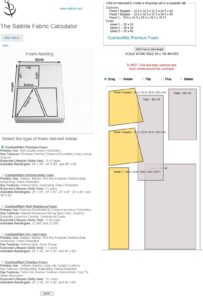
Here it is possible to define any number of four sided foam cushion shapes and drag and drop them across a scale worktable. The purpose of this app is to make it easy to determine how to create whatever foam shapes are needed at the lowest cost. Let’s say we need two keystone cushion shapes 32.5 inches on the left side, 24.5 on the top side, 32.5 on the right and 32.5 on the bottom. And let’s add to those two shapes a rectangle 76.5 x 18.5 inches. To determine the most cost effective selection of foam sheets (panels) necessary for this cushion project is not a simple matter. That is why the Foam Nesting App was created.
Let me demonstrate its use. First create the cushion shapes needed. And load all the possible foam panel sizes as well. That has been done in Figure 2 (the second and third foam panels have been rotated to show them entirely on the worktable).
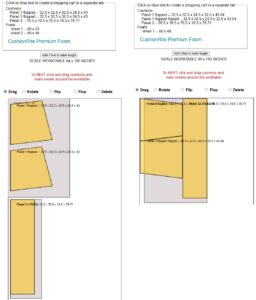
Figure 4: Manipulated foam coverage, right.
It is clear that the smallest added foam panel will not be helpful so let’s delete it. And the largest foam panel nicely covers the two keystone cushion shapes. And the long, narrow foam panel covers the rectangular cushion shape (Figure 3). Is this the best we can do? If so, we will waste almost half the foam, but it would suffice. Clicking on the light blue “CushionRite Premium Foam” text in the calculator takes us to a separate tab where we can build a shopping cart with our choice. For 3 inch thick foam the cost would be roughly $300.00 (the shopping cart will give you the current price). Can we do better?
Back in the calculator tab (the Sailrite tab will remain as it is), we can rotate, drag, and flip our shapes to bring them within the tightest confines until we get the “Manipulated Coverage” shown in Figure 4. Covering the cushion shapes with the largest available foam panel leaves a narrow uncovered section. But there is ample scrap to provide the necessary coverage. There should be no hesitation to use scrap as necessary. Gluing foam panels is easy and undetectable in the finished product. Returning to the Sailrite
tab, we can delete the items in our shopping cart and add one large sheet of 3 inch foam – the cost drops to roughly $200.00 (again, the shopping cart will have the current price — we saved nearly 1/3!).
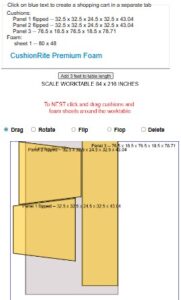
If an edge is rounded, as is often the case with “keystone” cushions like this, space patterns appropriately to permit cutting a proper curve. Of course, additional foam may be required although again scrap should save us more expense in Figure 5.
Getting the needed foam, of course, is just the beginning of the process. There are apps to create fabric patterns and a list of materials for your specific needs (depending on the cushion construction technique desired, choose one of the menu choices in the Fabric Calculator link here).