. . . and the safety significance of MMSI and GPS
Issue 119: March/April 2018
When we replaced the fixed-mount VHF radio on our 1986 cutter back in 2002, we noticed the new radio featured a red “distress” button on its console. The button was there because, in 1999, the Federal Communications Commission (FCC) began requiring fixed-mount VHF radios to include Digital Selective Calling (DSC) capability, part of the Global Maritime Distress and Safety System. I knew that large commercial vessels used this digital calling option regularly, but truth be told, we pretty much ignored it. We used Channel 16 for hailing, other VHF channels for chatting, and never had an emergency that required a Mayday. We’d heard the alarm go off a few times (it’s ear-shattering), but it had always stopped within a few seconds.
Fast-forward to Western Australia in 2014, where we had the opportunity to attend a DSC/MMSI lecture provided by the local coast guard. What an eye-opener! We had this capability aboard all the time and we never even realized it. What’s more, it’s easy, it’s fast, and it’s safer in emergencies than using Channel 16. And, with this extra feature, our VHF radio, like everything else aboard our boat, serves more than one purpose.
The setup
To benefit from all the smart features of DSC, you need a GPS-enabled VHF or SSB radio manufactured after 1999 with your Maritime Mobile Service Identification (MMSI) number entered into it. It’s important, too, to ensure the information associated with your MMSI is up to date.
An MMSI number is comparable to a digital call sign or a phone number. Each MMSI number is unique to a particular vessel.
Obtaining an MMSI number is easy. If you operate a recreational vessel and do not plan to sail or communicate via radio outside the USA, you can obtain an MMSI number for free through membership in one of several organizations, including BoatUS, Sea Tow, and US Power Squadrons. Non-members pay a small fee. If you do intend to travel out of the US, you must apply for an MMSI number directly from the FCC. This can be done online, but there is a fee, and you must also obtain a station license. Canadian vessels can obtain MMSIs from Industry Canada.
Because an MMSI number serves to identify a vessel, not particular equipment, all DSC-capable equipment, including Automatic Identification System (AIS), used aboard a vessel should use the same MMSI number. If you sell your boat, the MMSI number will usually transfer with it.
Using the red button
Anyone on board, even someone with no knowledge of how to operate a radio or of the boat’s position in latitude and longitude, can send a distress message. Once the radio is properly installed with its MMSI number entered into its memory, just lift the protective cap, push the red distress button for five seconds until the radio beeps, and the radio will transmit your vessel’s MMSI number, current position, and the current UTC time to the local search and rescue (SAR) service as well as to any DSC-capable vessels within the transmit area . . . all within 1/3 second. The distress call will repeat every 3 ½ to 4 ½ minutes on Channel 70 until it has been acknowledged.
The radio can only send the vessel’s position if it is connected to an operating GPS device. Some radios have a built-in GPS, others can be connected to the vessel’s navigation GPS.
Any potentially life-threatening issue, such as a heart attack or grave medical issue, collision, fire aboard, sinking, or piracy is a legitimate Mayday emergency and warrants use of the distress button. Running out of fuel or beer is not — that’s a call to a towboat company.
The SAR response
The SAR service (in the US, that’s the US Coast Guard) is alerted to the distress call and acknowledges it, whereupon the VHF radio from which the distress call originated automatically switches to Channel 16. The SAR service will then verbally hail that vessel to confirm the boat’s name, nature of the emergency, number of people aboard, course and heading, position in latitude and longitude, and vessel description.
If you have not entered your vessel-specific MMSI into a DSC-enabled radio, pushing the red button cannot help you. Sadly, the US Coast Guard (USCG) reports that of all VHF DSC distress alerts it receives, 90 percent do not contain position information and 60 percent do not contain a registered identity. Without this information, no SAR service can respond effectively.
Testing the distress function
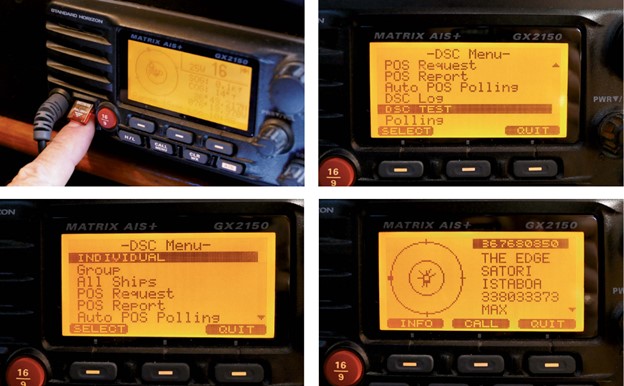
Most newer radios have a test mode, and the USCG has a quick and easy test procedure you can use to check your radio and ensure that the DSC option is operable . . . before you need it. The USCG’s automated-response MMSI number is 003669999. If you send a test message to this MMSI number, you should receive an acknowledgment within a few minutes. Interestingly, when we tested our DSC with the USCG recently, the response time was closer to 10 minutes.
On receiving a distress alert
Have you ever received a distress alert and not known what to do? You’re in good company. However, in your ignorance, you probably did the right thing . . . nothing. The signal is loud and disturbing and gets progressively louder the longer it sounds. Touching any button on the radio will silence the alarm. You can monitor and even record the message — MMSI number, location, and time — but do not respond. Instead, wait for the SAR service to respond. If there is no response within five minutes, it’s likely that the boat in distress is out of range of the SAR service’s network. Silencing the alarm by pressing a button automatically switches most radios to Channel 16. You can then relay the distressed vessel’s MMSI and position to the SAR service and contact the distressed boat on Channel 16. Otherwise, keep off the radio.
All Ships call
If an All Ships call is made, your radio will sound an alarm. The alarm will stop after 10 seconds or when you press any button, then automatically switch to the channel requested by the sending station. You should stay tuned and listen for the voice broadcast. This is often used for Pan Pan or Securité calls when Channel 16 has a lot of traffic, or in areas of the world where not everyone monitors Channel 16.
Other DSC benefits
Ever tried hailing another vessel on Channel 16 in a busy marina or during the height of the boating season? Forget it! Sure, you can use your cell phone, but DSC is just as easy.
You can enter another vessel’s MMSI number into your radio in much the same way you’d add their cell number to your contact list, and initiate an individual call to them. If the other vessel is within range, its VHF, if it’s turned on, will ring like a telephone — no matter what channel it’s monitoring. If the call is acknowledged, both radios will automatically switch to the working channel you specified and you can start your conversation.
If your local yacht or fishing club applies for an MMSI number, it can send out group messages to all registered members of the organization. It’s a great way to keep in touch with rally or race participants.
Another useful feature is the ability to send and receive position reports. This is especially helpful when traveling with another boat. As you know the other vessel’s MMSI number, you can request its current position. Once the other vessel acknowledges the request, its position is sent and displayed on your radio in latitude and longitude.
Make the most of DSC
If nothing else, everyone aboard, guests as well as crew, should be made familiar with how to access and use the DSC distress button. Not all VHF or SSB radios are the same, so consult your radio’s operator’s manual for specific instructions on DSC use.
Never use VHF Channel 70 to hail another vessel. It is reserved exclusively for DSC-generated distress traffic.
Consider having a DSC/GPS-enabled VHF in your ditch bag in case of emergency.
Test your radio every once in a while to make sure the DSC distress function is operable.
Next time you have the opportunity, use your DSC to connect with other boaters. You just might like it.
DSC and AIS – MR
Reading this article reminded me of how we used DSC in conjunction with AIS to hail a vessel we could see but for which we hadn’t pre-entered its MMSI number. Sailing (well, motoring) up the Salish Sea and the Inside Passage in 2013, we often found ourselves in relatively narrow channels with challenging tidal currents and traffic. Sometimes that traffic was a ferry, a burdened tug, or a cruise ship and we’d want to find out its intentions or let them know ours. Often we’d hail it on Channel 16 or 9 or what we thought was the designated commercial hailing channel, and get no response. In those cases, we’d locate the vessel (and its MMSI) on our AIS receiver and then call it directly, bridge-to-bridge, using DSC. On our radio, at least, an incoming DSC call is hard to ignore, like a loudly ringing phone. This approach was nearly always effective. And because our VHF radio (Standard Horizon Matrix) has an AIS receiver built into it, hailing a vessel in this way required nothing more than selecting a “Call” menu option.
Resources
Learn more about DSC and that “red button” . . .
- USCG DSC special notices – www.navcen.uscg.gov/?pageName=DSCSpecial
- Testing your DSC distress-call button – www.navcen.uscg.gov/?pageName=DSCTesting
- BoatUS tutorial on selecting and using a DSC-equipped VHF radio – www.boatus.org/dsc
- Applying for an MMSI through BoatUS – www.boatus.com/mmsi
- Instructions from the FCC about applying for ship’s license and transferring/updating MMSI information – wireless.fcc.gov/services/index.htm?job=licensing&id=ship_stations
- FCC list of fees – transition.fcc.gov/Forms/Form1070/1070y.pdf
Marcie Connelly-Lynn and David Lynn have lived aboard Nine of Cups, their Liberty 458 cutter, since 2000, when they sold up and sailed off. Since that time, they’ve put nearly 90,000 nautical miles under her keel and visited more than 36 countries on five continents. Their philosophy of “just a little further” has taken them around the world and around the five Great Southern Capes with lots of stops to explore along the way. They completed their first circumnavigation at Cape Town in 2015 and are currently back on the US East Coast. They blog regularly and maintain an extensive website at www.justalittlefurther.com.
Thank you to Sailrite Enterprises, Inc., for providing free access to back issues of Good Old Boat through intellectual property rights. Sailrite.com